Getting started
A tour of your dashboard, by following one order through it
5 minute read
The sidebar has a lot of tabs. Instead of naming them all, this guide walks one order through your shop from the moment someone messages you to the moment you know what you made on it. You will meet each tab where it actually comes up, and you will see that most days you only touch two of them.
The two you will live in are Today and Orders. Everything else is either something you set up once and stop thinking about, or something you open when you want a specific job done.
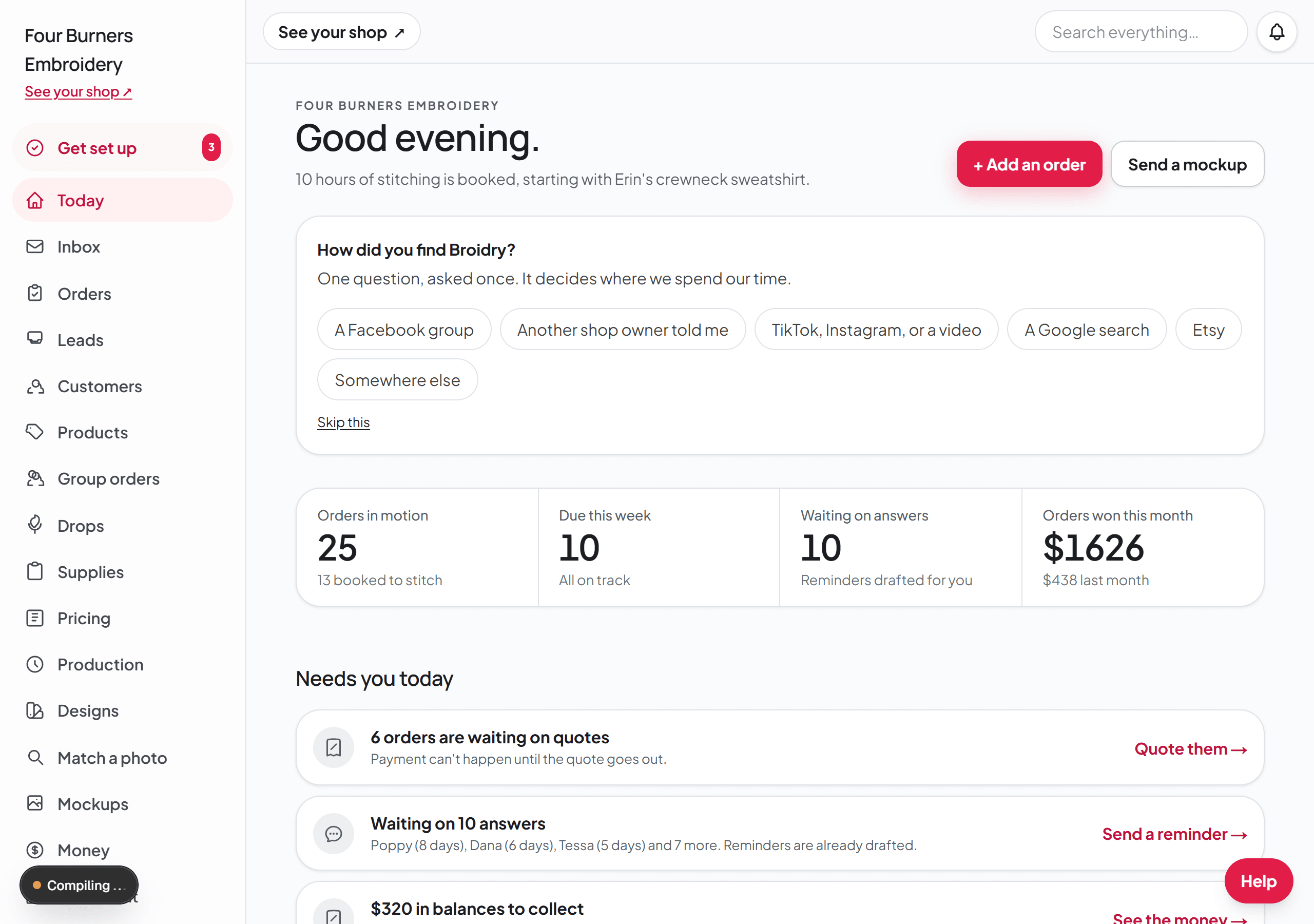
The pages you use every day sit at the top of the sidebar: Today, Inbox, Orders, Leads, Customers, and Production. The rest are grouped under Sell, Make, Money & settings, and Grow. Your rates, payments, and shop policies are all on Pricing & settings. Ask Broidry, Help & feedback, Billing, Share Broidry, Security, and Sign out stay at the bottom of the sidebar, even when you scroll it. The Help button is in the bottom-right corner of every page. On a plan that includes it, Your shop assistant sits right beside Help, and it is also a button at the top of Today.
Lower on Today, under your shop link, a card called Text your buyers from your shop's own number shows once. On the Shop and Atelier plans it has a Set up texting button that opens your Inbox page, where you get your shop's texting number. On the Free and Maker plans it names the plan that includes texting and has a See plans button. Press Not now and it never comes back. The guide Text your buyers about their orders covers the rest.
The search box at the top of every page
The search box sits at the top of every dashboard page. Type a customer's name, an order number, a product, a thread, a color, or the name of a page like shipping or sales tax, and click a result to go straight there.
It is also the quickest way to any page, including the ones that are not in the sidebar, like Packing slips or Completed orders. Type the page's name and press Enter to open the first result, or use the up and down arrow keys to pick another. On a computer, press the / key on any page to start typing in the box without clicking it. If nothing matches, click Ask Broidry about it and your words are already typed in for you.
When you open an order from Inbox, a customer's page, Production, or Today, the Back link at the top of the order takes you back there, not to the board.
It also answers the question that comes up halfway through an order: do I have this blank on the shelf? Type a color and a size, like deep royal s or maroon 2xl. The results start with a Stock line for each blank that comes in that color, and it says how many you have in that size. Type only the color and the Stock line lists every size you have any of. Click the line to open that blank's page at its counts.
A Stock line only shows a number for a blank you count. Open the blank from Supplies, turn on Count how many I have on hand, and fill in the counts for each color and size. A blank you don't count says so on its Stock line instead of showing zero.
Before anything: set your prices once
Open Pricing first, before your first order. This is your rate card: what you charge per thousand stitches, your hooping fee, your minimum, your digitizing fee. Every quote Broidry builds pulls from these numbers, so you set them once instead of redoing the math on every order.
Supplies is the other setup tab. It holds your blanks and what each one costs you. You do not have to fill it in to start, but the moment you do, your quotes include your real garment cost and your profit numbers become accurate.
Someone messages you: Leads and Orders
A message on Facebook is not an order yet, it is a maybe. Those live in Leads: a chat you pasted in, a question from your shop page, someone who built a design and did not finish. Every lead comes with a follow-up already written for you, so answering it is reading it and hitting send rather than starting from a blank box.
When the maybe becomes real, it moves to Orders. This is every order you have, from the one that arrived a minute ago to the one you shipped in March. Open any order and everything about it is on one page: what they want, the whole message history, the quote, what they have paid, and anything still missing.
That last part is the one worth knowing about. If the customer never told you a size or a thread color, the order says so at the top, and Broidry writes one message that asks for all of it at once, so you can ask one time instead of going back three separate times.
Before you stitch: Mockups and Designs
Mockups is the Mockup Studio. You put their name on the actual product in the actual font and thread colors, and send it. They approve it on their phone, and the spelling is their responsibility now instead of yours. That approval is what prevents stitching a misspelled name.
Designs is where your stitch files live, with a photo of each one, its true stitched size, and a note of which thread colors you used last time. When a reorder comes in six months later, the answer to which thread you used is already written down. Its neighbor Match a photo goes the other direction: a customer sends you a "can you make me this?" picture, and Broidry helps you figure out which of your designs — or what kind of design — the picture actually is.
Designs earns a second job once you are ready for it: the ones you choose can be offered on your shop page, so a buyer picks a design, picks a garment, and orders the pair without you building a separate product for every combination.
Making it: Production and Today
Production is your make list in the order things are actually due. Broidry uses your machine speed and each design's stitch count to sort what goes on the machine next and to show whether Friday is realistic. Two helpers live off this page: the Run sheet, a printable page that batches everything paid by garment with the thread numbers on it, and Machine mode, a phone-sized view for standing at the machine — what's next, click Start, click Done, and the screen stays awake.
Today is the page to open first each morning. It does not list everything; it lists what needs you right now. That list is the first thing on the page, in its own panel called Needs you today with the number of things in it beside the heading: anything running late, any quote waiting to go out, anyone you are waiting to hear back from, a supply running low. Each row is one line that names the person and the thing, with a link on the right to the page where you deal with it. Below the list are your numbers for the week and what is on the machine.
A red mark on a row means one of two things and nothing else: its date is today or has already gone by, or somebody asked you something and is still waiting on the answer. Everything else sits in plain gray, so the red ones are the ones to deal with first.
Every gray row has a three-dot button at its right end that opens a Snooze menu. Until tomorrow hides the row until tomorrow morning. For a week hides it for seven days. Mute takes the row off the list and keeps it off. Until a date opens a calendar: pick the day you want to be reminded, then press Snooze until then. Nothing is deleted by any of these: the work is still on its order, the chase list, or the Supplies page, and a snoozed or muted row comes back on its own if its date arrives or the customer writes again. A red row has no menu, because somebody is waiting on it right now.
It is the same list your morning email and your morning notification carry, so the number in the notification and the number on the page are always about the same things. The people you are waiting on also have their own page, called Chase — who has gone quiet, for how long, and a nudge already written for you to copy. Broidry never sends the nudge itself.
After it ships: Money and Customers
Money is what came in, what is still owed, and what the work actually earned after the blank and the thread. That last number is only accurate when Supplies is filled in.
Customers is your customer book. Every person, every past order, so when someone comes back wanting the same thing in a different color, it is one click instead of a search through your messages.
The tabs for growing, when you want them
Products is what your shop page sells: photos, colors, sizes, where the embroidery goes, and the price. Storefront controls how that page looks and reads. Together they are your website, and you can ignore both until you want customers ordering without messaging you.
One thing on your shop page is not set from Storefront, and it is the one people look for there: the turnaround. The line buyers read — currently booking about two weeks out, and typical turnaround on each listing — comes from a number called Standard turnaround, on your Pricing & settings page, on the card called Turnaround and time away. Change the number there and both lines change. The Shop policies box on Storefront is where you write your turnaround in your own words; it does not set the number.
Group orders turns one product into a team store. You send one link, every person picks their own size and name and pays for their own, and you get one production sheet at the end.
Drops is for a themed collection, like a holiday run that stops taking orders on the fifteenth, or a line you keep open until you close it. The same page holds business pages: a standing order page for one business you work with, at that business's own price. The guides called Drops: a themed collection on one link and Business pages: an order page for each business you work with cover both.
Marketing is the tab for when you want more work rather than more organization: reminders to past customers written from their real orders, a simple email tool, sales and discount codes, review requests, and two print kits — a craft-fair table card and a package insert card, both with a QR code to your shop.
Down at the bottom
Ask Broidry is the chat that answers questions in plain words about how Broidry works, like how do I send a mockup, and about how your shop is set up, like why a product isn't on your shop page. It does not look up your orders or customers. On a plan that includes it, Your shop assistant does that. If it can't answer, it sends your question to a real person automatically. Help and feedback goes straight to the people who build Broidry. Billing has your plan and every fee written out. Share Broidry is where you refer other embroiderers: it holds the link and a post to hand them, and the Affiliate Program if you want to earn a share. Security is your sign-in settings.
Security is also where you leave, and you can do it yourself without asking anyone. On your Security page, Download my data gives you every order, customer, quote and setting in one file, and there is a full backup that brings your photos with it. Underneath those is the delete. It clears your shop and your account together, it cancels any subscription, and it cannot be undone once you confirm. To do it, click "Erase everything", type your shop's name to confirm, enter your passphrase if you have one, and click "Permanently erase everything". If you want to come back later, sign in with the same email and Broidry offers to create a new account, so you start fresh. The new shop starts on the Free plan without a founding spot or a referral perk, because those are for a person's first shop. Take the download first if there is anything you want to keep. If you would rather someone at Broidry did it for you, email hello@broidry.com and say so, and it will be done.
Security also holds Your connections: every outside account Broidry reads from or sends through, in one list. Each row names the account, says what Broidry does with it in one sentence, and has a Disconnect button: your Square account, your Gmail inbox, your Facebook Messenger page, and your texting number. The Etsy email address is listed too, with no button, because there is nothing to revoke: turning off the forward in your own Gmail is the whole disconnect. Disconnecting never touches orders already on your board. Connecting still happens where each one is set up: Gmail on Security, and Square, Etsy, and Messenger on Import.
Two useful pages do not sit in the sidebar but are always one link away. Import brings your history in from another platform and sets up Etsy sale forwarding — open it from the link on your Today page, or go straight to your dashboard's Import page. And on a phone, the whole dashboard becomes four tabs plus a + button in the middle of the bottom bar; the + is the fastest way to turn a pasted message or a screenshot into an order.