Live embroidery events
Run the whole pop-up from one screen.
A market booth, a holiday party, a boutique's customer night, a company picnic. Guests order from a QR card on their own phone, every piece gets a ticket number, the name is already a stitch file, and the queue board shows what is in the hoop, what is ready, and how much work is left before you close.
The live day is on the Shop plan ($39 a month). Planning an event, the host quote, and the printables are on the Maker plan ($19 a month).
How a live event runs, start to finish
01 · Before
Set up the event and its menu.
Open Events, add the date, the hours, the place, and the host. Pick what guests can have stitched: items from your shop or ones you type in, with a show price for each, the fonts you will offer, and your thread colors. Add your own item with your waiver for pieces guests provide themselves.
02 · Before
Quote the host.
Type your hourly rate, setup time, travel, extra machines, and a helper, and Broidry writes the host a quote with the deposit that holds the date and the balance due the week of. The pace line tells you how many pieces fit in the hours on your machines before you promise anything.
03 · Before
Print the day's pieces.
The menu card, the signs, the order slips for the table, and the QR card that reads "Scan to order" all print from the event page.
04 · The day
Guests order on their own phone.
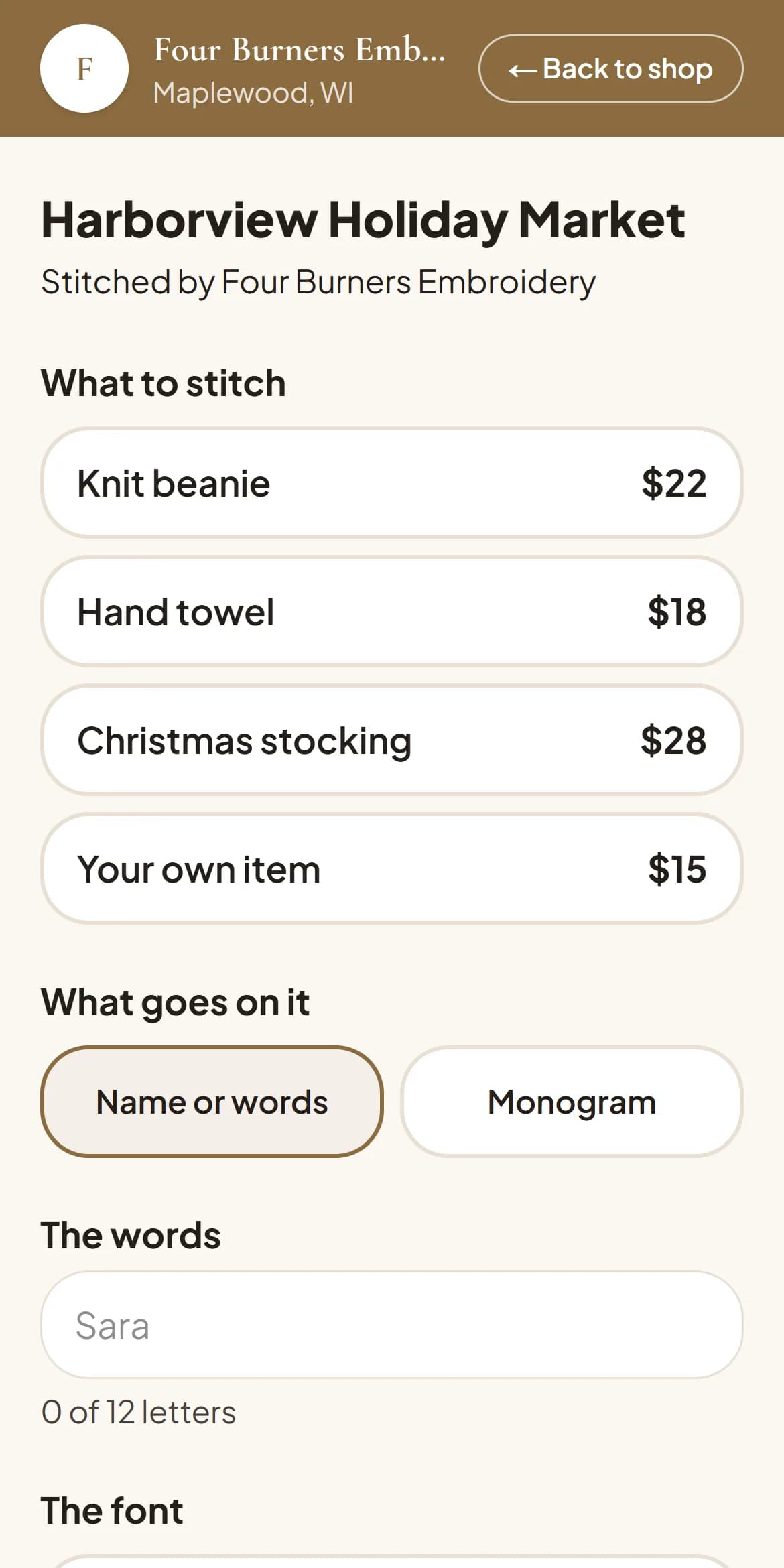
A guest scans the QR card, picks from your menu, types the name or initials, picks the font and the thread, and pays by card right there or at the table. A guest who adds their mobile number gets a text when their piece is ready.
05 · The day
The queue board runs the line.
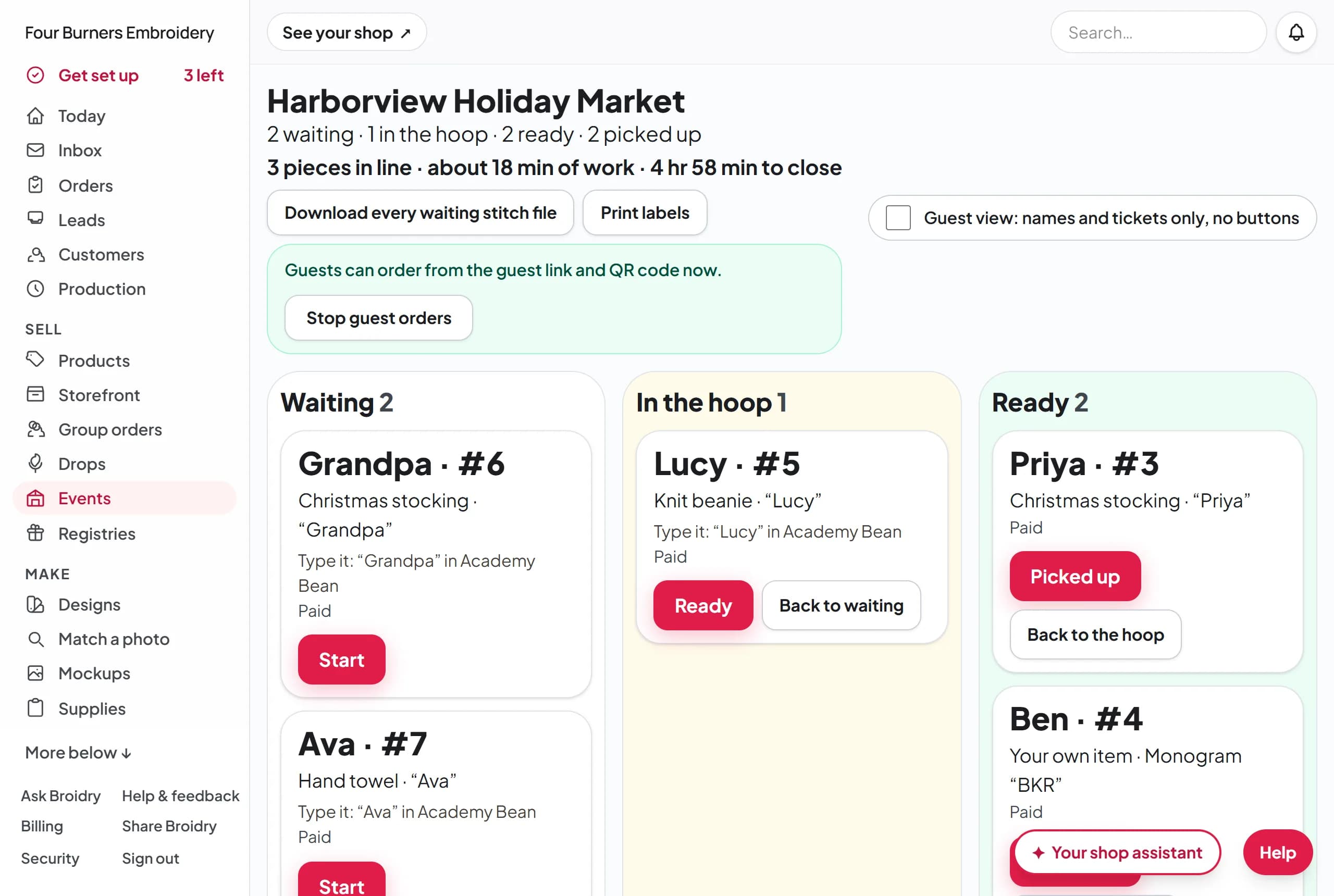
Every piece gets a ticket number. The board shows Waiting, In the hoop, and Ready, with the pieces in line, the minutes of work left, and the time to close. Press Start when a piece goes in the hoop and Ready when it comes out, and the guest hears about it.
06 · The day
The name is already a stitch file.
Each ticket on the board carries its lettering as a stitch file in your machine's format, and one button downloads every waiting file at once. Labels for the pieces print from the same board.
07 · The day
A helper takes orders too.
Make a helper's link and your helper opens the table screen and the board on their own phone, with no sign-in and nothing else of your shop. The table screen keeps taking orders when the signal drops.
08 · After
Close out the day.
The close-out lists every piece, how each one was paid (card, cash, Venmo, PayPal, or the host), and what is still owed. Pieces past the count in the host's quote are ready to invoice.
Why shops run their events here
The whole day on one screen.
No notebook of names, no shouting across the booth. The board knows whose piece is next and who is waiting on it.
Guests do their own typing.
The spelling comes from the guest's own thumbs, in the font and thread they picked, so the piece on the machine matches what they asked for.
Money is settled before you pack up.
Card payments on the guest's phone, the host's deposit up front, and a close-out that shows what is still owed.
It comes with your shop.
Events live next to your orders, customers, and money, so a guest who scans your card at the market is a customer in your book on Monday.
What it costs
Planning an event, the host quote, the pace line, and the printables are on the Maker plan ($19 a month). The live day, with the guest link and QR card, the queue board, the helper's link, the ready text, and the close-out, is on the Shop plan ($39 a month). Both plans come with the rest of Broidry: your orders, your shop page, your customers, and your money, with no separate app for events. See every plan
Questions shops ask
- Which plan do live events need?
- Planning an event, the host quote, the pace line, and the printables are on the Maker plan. The live day, with the guest link and QR card, the queue board, the helper's link, the ready text, and the close-out, is on the Shop plan. Nothing about events is held back for a higher plan.
- Do guests need an account or an app?
- No. A guest scans the QR card or opens the link and orders in the browser on their phone. The ready text goes to the mobile number they typed, and the ready email to the address they typed, if they gave one.
- What if the venue has no signal?
- Your table screen keeps taking orders when the connection drops and sends them when it comes back. The guest's own phone needs a signal to order from the QR card, so a table screen is the backup at a venue with none.
- Can a guest provide their own item?
- Yes. Put "Your own item" on the menu with its price. Your waiver shows on the guest's form, and the order is not placed until they agree to it.
- How does the host get quoted?
- You type your hourly rate, setup and teardown time, travel, extra machines, a helper, and blanks, plus the deposit and how many days before the event the balance is due. Broidry writes the quote, sends it to the host, and the host pays the deposit from the quote's own page. An event booked inside the balance window is due when the host books.
- What machine formats does the stitch file come in?
- The lettering file for each ticket is cut in the format your event is set to, the same formats Broidry cuts for an everyday order. Set the format once on the event.
Your next event, from the QR card to the close-out.
Open your shop, add the event, and print the QR card. The board is ready when the first guest scans it.
The Free plan costs nothing until your first sale, and signing up does not ask for a credit card. The Free plan covers 15 orders a month, however your customers pay.