How it works
From first message to finished piece.
Broidry keeps every part of an order — the details, the quote, the approval, the payment, the stitching — in one place. Here is how an order moves through it, start to finish.
The Free plan costs nothing until your first sale, and signing up does not ask for a credit card. The Free plan covers 15 orders a month, however your customers pay.
Already taking orders?
The eight steps below are your whole flow.
If customers already message you on Facebook, Instagram, or text, keep reading. The steps below follow one order from the first message to the finished piece, and step one shows how a pasted conversation becomes an order.
Start at step one →Selling already, tracking nothing?
One place for everything in your head.
A few orders through Facebook, prices figured out one conversation at a time, design files in a downloads folder. Broidry is the one place all of it goes.
See what goes in one place →Never sold anything yet? Start here.
Three steps to your first order.
- 1Add one product with one price. You can see how a real shop describes things and copy its approach.
- 2Share your shop link anywhere. The shop page only shows what you have added, so a shop with three products looks complete, not empty.
- 3Take your first order — even a practice order from yourself, so you see exactly what your customer will see.
Step 1
An order comes in
Happens on: your shop page, or the Quick add page
There are two doors. A customer can order on your shop page, where the form makes them answer everything — size, spelling, colors, date — before it submits. Or they message you on Facebook, Instagram, or text, and you drop a screenshot of the conversation on the Quick add page. Either way, the order ends up in Broidry instead of in a chat thread.
See the message-to-order steps in detail →
Step 2
It shows up on your board
Happens on: the Orders board
Every order sits on one board and moves through the same columns: New, Quoted, Paid, Making, Done. Each card shows who it's for, what it is, and when it's needed. If a detail is still missing — a size, a thread color — the order carries that too, so nothing gets forgotten.
More about the board →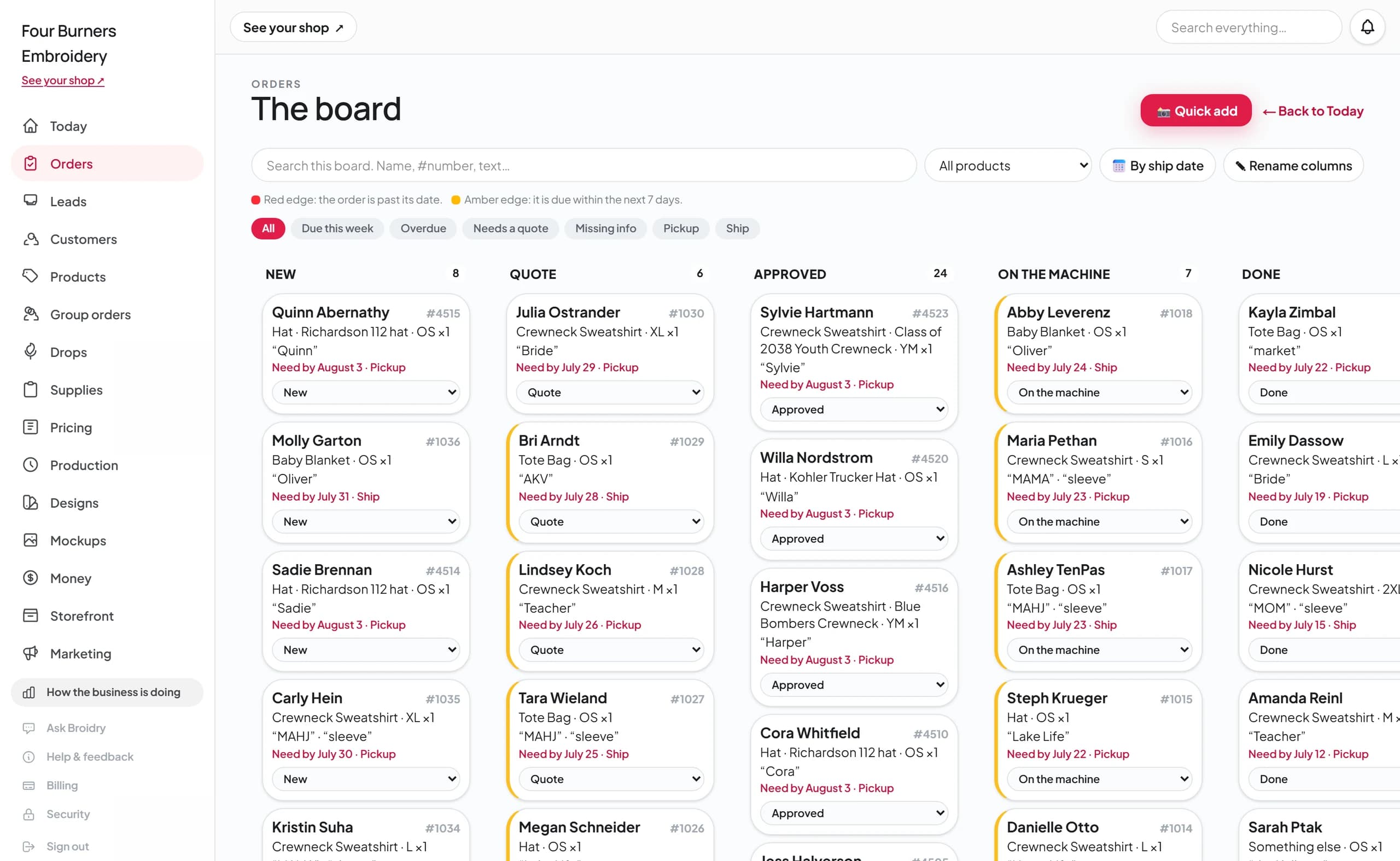
Step 3
You quote it
Happens on: the order, using your Pricing & settings page rates
Broidry builds the price from your own rate card — the garment cost, the stitch count, hooping, your handling buffer — and shows you the math. The customer never sees that breakdown. They get a clean page with just their total.
More about quotes and payments →Step 4
The customer approves a mockup
Happens on: the Mockup Studio
Before anything is stitched, you send a mockup of the piece — the real garment, your real fonts, the actual thread colors. The customer checks the spelling and clicks approve. That approval is saved on the order, so what you stitch is exactly what they signed off on.
More about the Mockup Studio →
Step 5
They pay before you stitch
Happens on: the order's payment step
The customer can pay by card through Stripe or through your own Square account, or you record the Venmo, PayPal, cash, or check payment you already took. The order is marked paid, and orders move on to the stitching queue only when they're paid — in full, or, if you take deposits on big jobs, when the deposit is paid, with the balance tracked on the order until it's settled. You never put thread into something that isn't paid for.
More about payments →Step 6
The queue tells you what to stitch
Happens on: the Production page
Paid orders line up by ship date, each with an estimated machine time. An order that looks like it will run late gets flagged early. A run sheet pulls together the words, fonts, threads, and blanks for everything in the run, so a stitching day starts with one page instead of ten open tabs.
More about production →
Step 7
You stitch it and mark it done
Happens on: the Production page and the order
Click Start when the piece goes on the machine and Done when it comes off. The order already says whether it's porch pickup or shipping, and the customer's address is on it if it ships. The card moves to Done and the order is finished.
More about production →Step 8
The money is already tracked
Happens on: the Money page
Because the payment was recorded on the order, the Money page is already up to date: what you collected this month, what's still owed, your expenses, and a profit estimate. There's no separate bookkeeping step — running the order was the bookkeeping.
More about the Money page →
The same flow handles more than one order at a time.
Group orders
One link collects a whole team, club, or school order. Every member picks their size and pays their own share, and when it closes, it comes back to you as one batched order to stitch.
Drops
A limited-time release of a design with a close date. Buyers order before it closes, and the whole run moves through the board and the stitching queue together.
Ask Broidry
Ask how anything works in plain words, like “how do I send a customer a mockup?” Broidry answers from its written guides and your shop's own settings.
Live embroidery events
At a market or a party, guests order from a QR card on their own phone. Every piece gets a ticket number on the board, one press tells the guest it is ready, and the close-out shows what was paid and what is still owed. The live day is on the Shop plan, and planning is on the Maker plan. How a live event runs
One order, one place, the whole way through.
You don't copy details between apps, scroll back through old messages, or lose track of an order. Everything stays with the order from the first message to the finished piece.