Orders & Quotes
Every order on one board.
Instead of orders scattered across texts, DMs, email, and a notebook, one board shows what's new, what's owed, and what's next.
The Free plan costs nothing until your first sale, and signing up does not ask for a credit card. The Free plan covers 15 orders a month, however your customers pay.
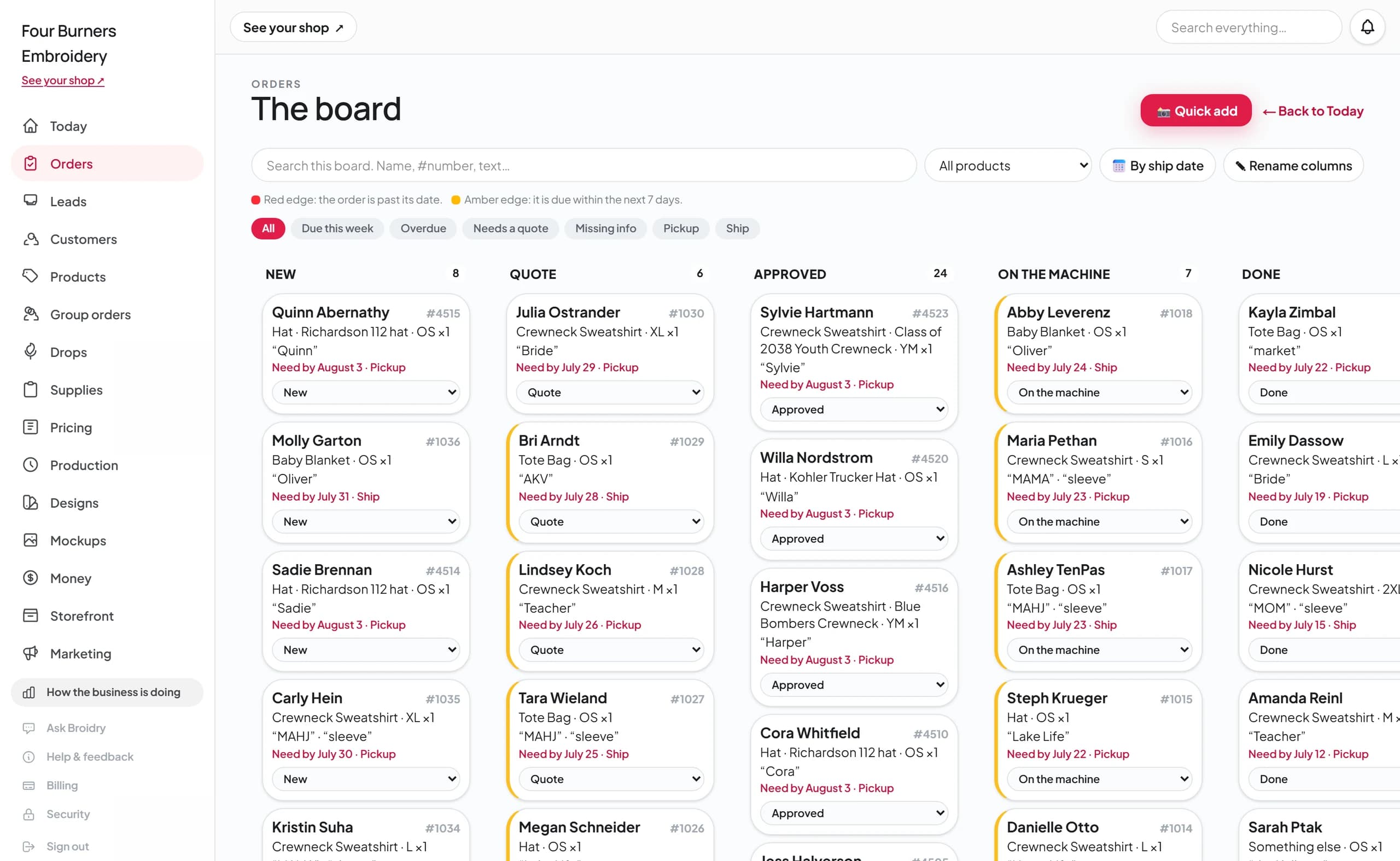
No order gets forgotten.
Every order carries its status, its due date, and what it's still waiting on. Filters show you due-this-week, overdue, needs-a-quote, and missing-info in one click.
How a Facebook message becomes an order.
Here is the whole thing, step by step, with a real example. The conversation below is invented, but every Broidry screen after it is a real screenshot of Broidry handling exactly that conversation.
Step 1
A message comes in.
Someone messages you on Facebook, Instagram, or text. It sounds like an order, but half the details you need aren't in it — no size, no thread color, no way to reach them outside the chat.
Megan
Messenger
An invented conversation, for the example
Step 2
You screenshot it and drop it into Broidry.
Take a screenshot of the conversation, or copy the text, and drop it on the Quick add page. That's the whole job — you don't retype anything.

Step 3
Broidry reads it and builds a draft order.
Broidry pulls out what the message actually said — Megan, a crewneck sweatshirt, "Nora" on the front — and fills in a draft order. Anything it wasn't sure about is called out at the top for you to double-check. Nothing is created yet; you review it first.

Step 4
It lists every missing detail and writes one message that asks for all of them.
Five things are still missing here — the contact info, the garment color, the size, the font, and pickup or shipping. Broidry lists them and drafts one reply that gives Megan a price and asks every question at once, so you never have to go back three separate times. You review the message and send it yourself.

Step 5
The order shows up on your board.
One click creates the order, and Megan is on the board with everything that's still missing tracked on the order. The conversation can scroll away — the order can't.

What the board does for your shop.
One board for every channel
Orders from your shop page, Facebook, texts, and in-person all live on the same board, moving from New to Quote to Approved to On the machine to Done.
Quotes from your real pricing
The quote is built from your price list and the order's actual details. The customer gets a clean sheet with just their total — never your cost breakdown.
Flags missing answers for you
The board flags any order with a missing detail — no size, no date, no approval — and drafts a follow-up message you can review and send in one click.
Quick add for orders that start in person
When someone hands you a hoodie in person, you can snap a photo and type a couple of lines, and the order is on the board with everything else.
Bringing your history in.
If you have been selling for years, you do not start from zero. Broidry reads the order export you download from Etsy, Shopify, Square, Squarespace, Wix, Big Cartel, or PayPal — or any plain spreadsheet, by pointing at which column is which. Your past customers fill in your client book, your past orders come in with their totals so your sales history is there from day one, and product exports come in as draft listings for you to review.
Every import shows you a preview of exactly what will come in, and nothing is saved until you approve it. It lives on the Import page of your dashboard.

The Today page shows what needs your attention.
Open the dashboard and it lists what needs you today: quotes waiting to go out, customers you're waiting to hear back from (with a follow-up message drafted), and what's on the machine this week.