Your shop page
This week's posts: what to post, where and when
4 minute read
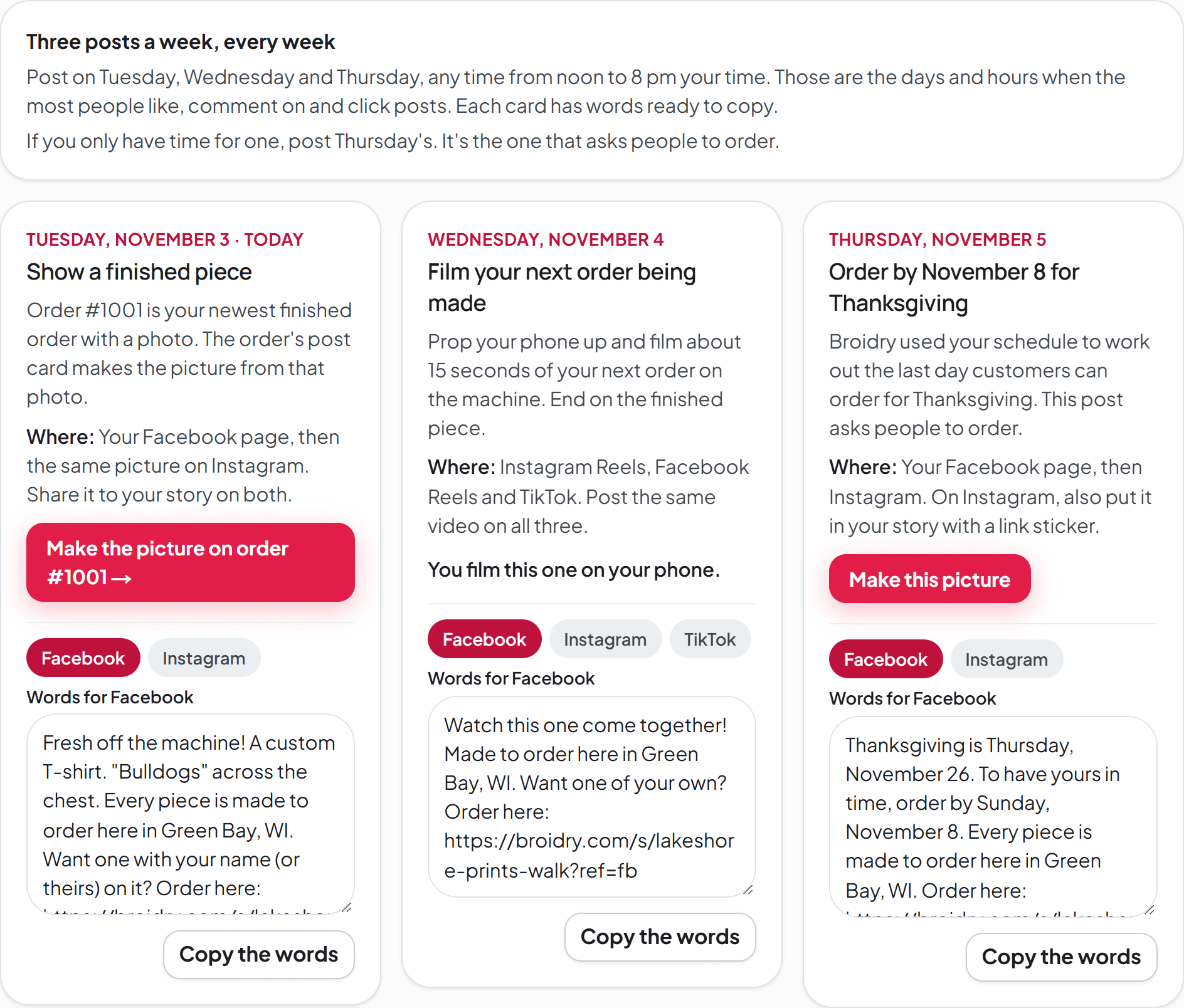
Open Marketing and press "Open this week's posts →". The Posts page opens on three cards, one for each posting day: Tuesday, Wednesday and Thursday. Each card says what to post and where to post it, and has the words ready to copy. The cards change every week on their own. You copy the words and post them yourself.
Post any time from noon to 8 pm your time. Sprout Social studied about 2 billion likes, comments and clicks in 2026. On Facebook and Instagram, Tuesday to Thursday afternoons and evenings got the most. Weekends got the fewest.
If you only have time for one post a week, post Thursday's. It's the one that asks people to order.
Tuesday: show a finished piece
The card picks your newest finished order from the last 60 days that has a photo on it. It picks a regular order over a gift order. Press "Make the picture on order #" to open that order's Fresh off the machine card. That card makes the picture from the order's photo.
If the order is a gift, the card says to wait until it has been opened before you post it.
If you have no finished order with a photo, the card uses one of your product photos. Press "Make this picture" to open the post maker with that photo. Add a photo to the next order you finish and next week's card uses that order.
Wednesday: film your next order being made
Prop your phone up and film about 15 seconds of your next order on the machine. End on the finished piece. Post the same video to Instagram Reels, Facebook Reels and TikTok. The card has the words for each of the three. You film this one yourself, so the card has no picture to make.
Thursday: ask for the order
When an order-by date is three weeks away or closer, Thursday's card is about that date, like "Order by December 5 for Christmas". Broidry works out the date from your schedule, just like the Season deadlines cards on Sales & seasons. The card uses the occasions you picked there. If you have never picked any, it uses Christmas. In the three days before the date, the words say last call.
If you picked Small Business Saturday, the card in the week before it invites people to shop with you that day.
The rest of the year, the card shows one product with its price and a link straight to that product. If you added a product in the last three weeks, the card shows it first and calls it new in the shop. Otherwise the card picks a different product each week. It never picks the one on Tuesday's card.
The words for each place
- 1Above each card's words are buttons for each place: Facebook and Instagram, and on Wednesday's card TikTok too. Press one to see the words for it.
- 2The Facebook words end on a link people can click.
- 3Instagram doesn't make links in a caption clickable, so the Instagram words say the link to order is in your bio. For Thursday's post, also add it to your Instagram story with a link sticker.
- 4The TikTok words give your shop's address for people to type, and ask them to message you.
- 5Change anything in the box, then press "Copy the words" and paste them into Facebook, Instagram or TikTok. The hashtags go on their own line at the end. Broidry picks them from the piece and your town.
Make the picture
Press "Make this picture" on a card. The post maker opens with that card's words and its product's photo. Change anything, then press "Download this post". The card's words show again under the picture. Copy them from there. See Make a post for everything the post maker can change.
Which places bring orders
Every link in the words ends with ?ref=fb, ?ref=ig or ?ref=tiktok. That ending tells Broidry which app the person came from. The Visits page then counts them under Facebook, Instagram or TikTok, even if the app opens the link in a different browser.
Under "Links for your profiles" are the same kind of links for your Instagram profile, your Facebook page's website, and your TikTok profile. Press "Copy link" next to one and paste it into that app.
The "Which places bring orders" box uses your Visits page. It shows where people came from in the last 30 days and how many of them ordered. The Visits page comes with the Maker plan and every plan above it. On the Free plan, the box says the Visits page comes with Maker. The three posts, their words and the links are on every plan.
Before you post
If your shop is hidden, a red line at the top of the Posts page says so. Anyone who clicks a link in your posts would see a page that isn't there, so turn your shop on in Storefront first.
If you have no products buyers can open yet, the posts link to your shop page, and the page says so.