Orders and customers
Quotes, payments, and your rate card
4 minute read
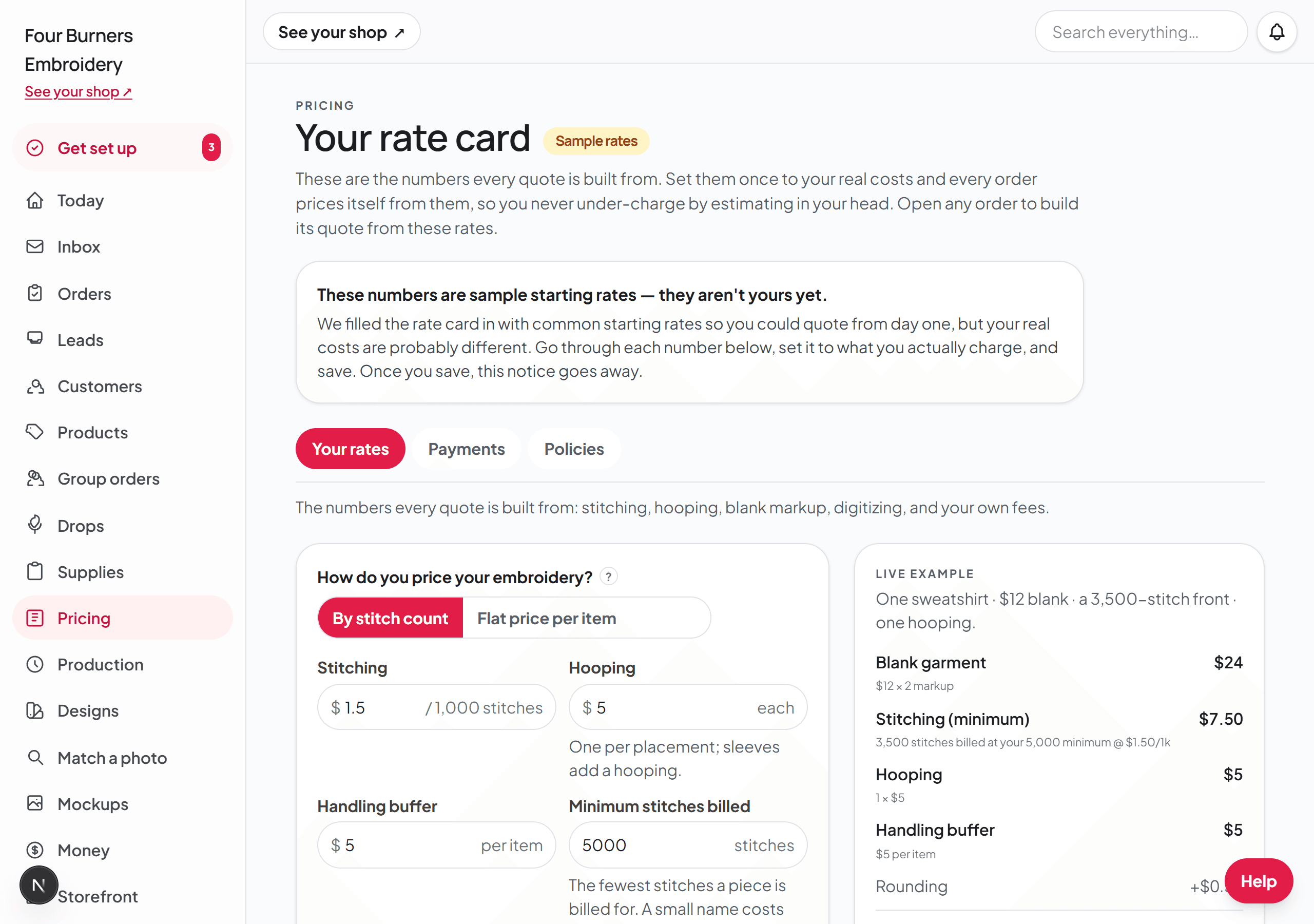
Your rate card does the math
On the Pricing & settings page, set your numbers once: what you charge per thousand stitches, per hooping, for digitizing, and your minimum. The card also holds the numbers embroiderers forget to charge for — a handling buffer, a floor on how few stitches you will bill, a markup on the blank, and separate fees for appliqué and 3D puff, the two techniques that take real extra work. Every quote after that is built from the same card, so you never guess what you charged last time and never accidentally work for free.
The "Save rate card" button stays at the bottom of your screen the whole time you're on the card, so change any number and save it right where you are. If you try to close the page with changes that aren't saved, your browser asks first. The other settings on the page are on two more tabs: Payments, for how buyers pay you, and Policies & shop details, which has a "Jump to" row at the top for proof changes, turnaround, timezone, your morning brief, inches or millimeters, shipping, and your mailing address.
Building and sending a quote
When you already have an order, the quote builder is on that order's page. When you only need to send someone a price, press New quote instead, which needs no order and no customer details. The steps below are for a quote on an order, and the next section covers New quote.
- 1Open the order and click the quote builder. It arrives pre-filled from the order itself: the quantity, the placements, and an honest stitch estimate.
- 2Adjust anything you want. Every line is editable, and the total updates as you type.
- 3Click Save and email the quote. That stores the price and emails the customer their quote link, where they see the itemized lines and accept with one click. The acceptance is stamped on the order.
Sending a quote without starting an order
Someone asks what 12 hats with their logo would cost, and you don't have their email, or you don't want to make an order for a price they haven't said yes to. Press New quote. It's at the top of the Orders page next to + Add an order, on your Today page, and on the Quick add page.
New quote opens the same quote builder, with your rate card, digitizing, tax, and discounts. Nothing about the customer is required. Type what the quote is for in What is this quote for? (for example, 12 hats with our logo on the front), set the numbers, and press Save quote.
The saved quote shows a Copy quote link button. Paste that link into a text, a Facebook message, or a DM. Your customer opens it, sees the itemized price, types their name and an email address or phone number, and presses Accept this quote. From that moment it's a normal order on your board with their details on it, and paying works the same as any quote you send.
If you do have their email address, type it under Customer (optional) at the top of the quote and press Save customer. The Save and email the quote button then works the same way it does on an order.
For a customer you have sold to before, start typing their name in the Name box under Customer (optional) and pick them from the list that drops down. The list has everyone you have typed on an order or a quote, and when one of their orders has an email or phone number, that fills in too. Then press Save customer.
Accepting a quote for a buyer who said yes in person
Some customers answer a quote by text, by phone, or across the counter and never open their quote link. Open the order and click its Quote & payment tab. Under Copy quote link, press Mark accepted for the buyer. The order moves to your board as accepted, the same as if they had pressed Accept this quote themselves, and it still needs payment the same way: the customer gets their payment link by email if you have their address, and you mark the order Paid once the money is in.
The order page records that you accepted it for them, so you can tell a quote the customer accepted from one you marked yourself.
On a quote you started with New quote, fill in the customer's name and an email address or phone number under Customer (optional) and press Save customer before you mark it accepted. An order needs someone to be for.
Sending a message and a photo with the quote
You can write the customer a message, add one photo, and send both in the same email as the quote. They get one email with your words, your photo, and the price together, instead of a price in one email and your note in another.
Right above the Save and email the quote button is a small link called + Add a message or photo for the buyer. Click it and a box opens. Type your message, then press the button, which now reads Save and email quote + message. The same link sits above Email this quote to the buyer on a saved draft, and above Send it again on a quote you already sent.
To send a photo, click + Add a photo under the message box and pick one, or drag a photo onto the box, or paste one into it. Photos straight from an iPhone work. A small copy of the photo shows under the box so you can check it is the right one, with Replace and Remove beside it, and the button reads Save and email quote + message + photo. You can send a photo with no words too.
Your message goes at the top of the email, above the price, with the photo right under it. Both also show at the top of the quote page the link opens, where your customer can open the photo full size, and both are saved in the order's conversation, so you can always see what you sent.
The message and photo are optional. If you never click the link, the quote goes out exactly as it always has. To send the quote without them after all, click Remove message under the box. With a photo attached, that link reads Remove message and photo.
Saving a quote as a draft
You will not always want to send a price the second you finish working it out. Sometimes you want to sleep on it. Sometimes a customer walks in halfway through and you need to stop. And sometimes the price is already agreed somewhere else, on Etsy or Facebook Marketplace, and you are only recording it here.
That is what the second button is for. Under the total there are two: Save and email the quote, which stores the price and sends it to the customer, and Save as a draft, which stores it and sends nothing at all. A draft is saved on our end, not in your browser, so it is still there tomorrow, on your phone as well as your laptop.
A draft stays on the order until you send it. Open the order, and the saved quote shows the total, the date you saved it, and every line. Underneath is a button that says Email this quote to the buyer. Press it and the customer gets exactly the quote you were looking at.
Quoting the digitizing first, then the pieces
An embroidery price is built on a stitch count, and you do not have a real stitch count until the design has been digitized. Until then every quote is an estimate, and if the estimate is low you are the one who pays the difference.
So a quote can come in two parts. In the quote builder, the first thing on it is a switch called What this quote covers, with two choices: The whole order and Digitizing only. Pick Digitizing only and the quote charges your digitizing price and nothing else. Your shop minimum does not apply to it, because the minimum is a floor on a finished order and this is half of one.
The customer's quote page and their email both say this covers the design setup only, and that a second quote for the pieces is coming. So the bigger number later is one they were told to expect.
Once the design is digitized, open the order and press Edit quote. Put this switch back on The whole order and price the pieces from the real stitch count.
That second quote still carries your digitizing line, so whatever the customer already paid comes off the total instead of being charged twice. The Digitizing choice on it shows Logo or Handwriting, whichever the first quote charged, and cannot be switched to None. That keeps the setup fee they paid inside the total it comes off. If you truly need to start the quote over, press Remove this quote under the saved quote and build a new one.
When the customer pays the digitizing quote, their receipt email and their quote page say the design setup is paid and that a second quote for the pieces is coming. When you email the second quote, it tells them the design is digitized, and it says how much they already paid and how much is left.
Quotes with more than one item
A business order rarely comes as one garment. Two tees, a polo, and six caps is normal — and that is one quote, not four. In the quote builder, click Add another item to price each garment on its own lines: its own blank, its own stitching, its own quantity. The customer sees one itemized quote and accepts the whole thing with one click.
One thing to know while this is new: the order page's spec section still describes the first item, so keep the full list in the order's notes or the conversation until you build the quote. The quote itself carries every item.
Show buyers what is behind each price
A quote line that reads only "3 pieces $147.00" invites a question, and the question comes back to you. You can show the buyer the work behind the number instead.
The switch is called "Show buyers the breakdown" and it sits under the send button on a saved quote. It starts off, and off means one price per item, the way quotes have always read. Turn it on and the buyer's quote page, the printable quote sheet, and the invoice all print every part they are paying for: the stitching with its count, the hooping, the handling charged once for the item, and any appliqué or puff on top. The rows add up to the total exactly, with the rounding shown as its own line instead of hidden inside another one.
It is one setting for your whole shop rather than a choice per quote. You decide once how much your customers see. Turning it on or off changes every quote from your shop the next time the buyer opens it, including quotes you already sent. A quote built before this switch existed has no breakdown saved with it, so it keeps showing one price per item.
When the piece is the customer's own item
Stitching on a jacket, tote, or blanket somebody already owns is different work, because a needle through their property cannot be undone. Broidry has a waiver for it, and the buyer accepts it before the order goes through.
You write it once. Open Storefront, choose the How customers order tab, and find the section called "Waiver and order terms" (the Jump to row at the top of the tab takes you there). Each part of it is a row you click to open, and a row says On when it has wording in it. The row called "Customer-supplied garment waiver" is the one that covers somebody else's item. While it is empty there is a button called "Use a sensible starter" that fills in wording naming the real risks, which you can then edit into your own words. The row "Order terms (every order)" applies to all your orders rather than only customer-supplied ones. Click "Save waiver & terms" when you are done.
After that it works on its own. A buyer ordering on a piece they supply has to check the box before the order goes through, and the wording you had saved that day is stamped onto the order with the time they accepted it. A quote you type by hand for somebody's own backpack carries it too, on the quote page, so the accept button stays off until it is checked.
A buyer who has to mail you their item also needs to know where to send it. Broidry fills that in from your ship-from address on the Shipping page, so there is nothing new to type if you have ever bought a label here. Once the order exists, the buyer's order page shows your address, their order number, and how you want the package packed, and the same details appear on the quote page the moment they accept and in their payment receipt. The address is never put on the product page itself, so no package arrives before there is an order to match it to. How you want it packed is the row called "When buyers mail their items to you" in the same "Waiver and order terms" section. If that row says "No address yet", add your ship-from address on the Shipping page first, because until then buyers who need to mail you something are shown nothing.
Some pieces are made out of what the buyer sends, like letters cut from their baby's onesies, and what they send does not come back whole. The garment waiver does not cover that, so it has its own switch and its own box. Open the product and turn on "The buyer sends in their own item and I cut it up". Then write the wording in the row "When you cut up the customer's own item" in the "Waiver and order terms" section, or press "Use a sensible starter". A buyer cannot accept a quote for that product until they check the box saying they know the cutting is permanent and they may not get their item back, and what they agreed to is saved on the order with the date. The switch is there on every product, including one sold exactly as shown.
Pricing an item yourself
The rate card prices stitching. It cannot price a DTF print, a screen print, or a vinyl tee, because those are not measured in stitches. So any item on a quote can be priced by hand instead: flip Price this item myself, type what you charge for the work, and the rate-card lines for that item step aside. The blank, the quantity, and the rest of the quote keep working the way they always did.
Name the work while you are there. The line next to the price is what your customer reads on the quote — type DTF print or Screen print and that is what the quote says, instead of the word Embroidery. Every other item on the same quote can still be priced from your rate card; the choice is per item, not per quote.
You only flip that switch by hand for a one-off. If the product itself says it is printed, engraved, or other custom work like sewing — set under How this product is made in the product editor — its quotes open with Price this item myself already on and the work already named, so you are never asked for a stitch count on something that is never stitched. The price is left blank on purpose, because only you know what that job is worth.
Charging a blank at cost
Every blank on a quote normally carries the blank markup from your Pricing & settings page, so a $4.72 hat goes on the quote at $9.44 when your markup is 2. When you want to pass one blank through at exactly what you paid for it, type its cost in Blank cost (wholesale, each) and turn on Charge this blank at cost (no markup), right under Customer supplies the garment. That item's blank is charged at $4.72, and every other item on the quote keeps your markup.
It works with Price this item myself. Say you charge $24 for the embroidery on a hat that cost you $4.72: type 4.72 as the blank cost, turn on Charge this blank at cost (no markup), turn on Price this item myself, type 24 as the price per item, name the work Embroidery, and leave This price is the whole item off. The quote comes to $28.72, and a buyer who sees the breakdown reads Hat $4.72 and Embroidery $24.00.
Your customer never sees the words cost or markup. The switch only appears once a blank cost is typed and the customer is not supplying the garment, and it is hidden when This price is the whole item is on, because a whole-item price already has the blank inside it.
Sales tax
Your tax rate lives on the Pricing & settings page, in the Sales tax box at the bottom of your rate card. Type the rate your state or county asks you to collect and name the line whatever you want your customer to read, like Sales tax (NJ 6.625%). Leave the rate at 0 if you do not collect tax, and nothing about tax appears anywhere.
Once you have a rate, a second question appears right under it: Is there anything you sell that isn't taxed? Several states charge tax on bags and accessories but leave clothing alone, so check the categories your state leaves alone and Broidry stops charging tax on them. Say your state does not tax clothing: check tees, sweatshirts, hoodies, polos, and onesies, and leave totes and pouches unchecked. Broidry does not decide this for you, because it changes from state to state — you check what yours exempts, and your accountant is the one to ask if you are not sure.
That setting is what every new quote starts from, and it works the same whether you build the quote yourself or a customer orders straight off your shop page. On an order with a tee and a tote, only the tote is taxed, and the setup fee, rush charge, and shipping on that order are taxed for the taxed half of it. You can still change it on any one item while you build a quote — every item on the quote builder has its own Don't charge sales tax on this item switch.
Wholesale and special pricing
Some customers have a deal — the salon that gets 10 percent off, the school that is tax exempt. The quote builder has a section called Wholesale and special pricing for exactly this. Give the quote a discount as a percent or a flat amount, label it so the quote says why (Wholesale, Team discount), and if you charge sales tax, mark the customer tax exempt on this quote — for a school, a nonprofit, or a reseller with a certificate. The discount shows as its own labeled line, so the quote explains itself, and your rate card never changes.
Getting paid
You choose how you take money. If you connect card payments, customers pay right on Broidry and Broidry marks the order paid. If you prefer Venmo, cash, or check, the customer reports the payment and it goes onto the order for you to confirm, so the order always shows what has been paid and what is still owed.
Your Venmo handle and PayPal.me name
The How buyers pay card, on your Pricing & settings page under Payments, has a box for your Venmo handle and a box for your PayPal.me name. Fill in either one and every quote your customers accept shows a Venmo or PayPal button that opens your account.
In the PayPal box, type the letters and numbers after paypal.me/ in your PayPal link. You can paste the whole link instead: a paypal.me link, a paypal.com/paypalme link, and your PayPal business page link at paypal.biz all work, and Broidry keeps just the name. Under the box you see the exact address your customers' PayPal button opens.
If what you typed can't become a PayPal link, like an email address or a link to your own website, the box turns red and says what to type instead. The Save payment settings button can't be pressed until it is fixed.
When your customers pay
First, the part that is true no matter which setting you pick. If a product has a set price on its listing, the customer already saw the real number and chose it — the size upcharge and any paid add-ons included. Broidry keeps that number. The order arrives already priced and already payable, and you never build a quote for it. Nothing about your payment setting can make Broidry forget a price it already showed a customer.
The setting decides what happens with everything else, and you pick it on the Pricing & settings page under Payments, in the card called How buyers pay. A new shop starts on Up front, when they order. After you confirm the price means custom orders come in first, you send the quote, and the customer pays when they accept it. That is the right setting when most of your work needs a conversation before you know the number.
Either way, the moment a customer accepts a quote, Broidry emails them their payment link, so they can pay from their inbox instead of hunting for the page. If nothing has been paid after three days, Broidry sends one reminder, and one more four days after that. Then it stops. An order nobody has paid anything toward after two weeks files itself into your archive, and you can put it straight back if the customer turns up later. You never have to chase the first payment yourself.
Up front, when they order goes further: even work priced from your rate card is charged at the time it is ordered, so there is no quote to send on anything with a number attached. A product you marked "Quote me", and any custom request, still gets a quote from you first on either setting, because until you have talked to that customer there is no honest number to charge. Up front decides when money moves on a job that already has a price. It never lets Broidry invent a price you said you would set yourself.
If you take cards and card is the only way you list, up front goes one step further: the customer goes straight to the card form, and the order does not reach you until the card clears. Nobody can leave you an order they never paid for. If they close the card form, you never see the order at all — it was never yours.
Two things have to be true for that. Your card account has to be connected, because nothing else can hold an order open waiting for money — a Venmo handle cannot turn an order away. And the payment fields below it have to be empty. If you list Venmo or PayPal, you have told your customers there is another way to pay, so Broidry keeps the payment page for them and the order is saved first.
When the order is saved first and the customer walks away from the payment page, it does not sit on your board pretending to be work. It waits under Not ready to stitch yet, tagged waiting on payment, and it shows up on your Chase list as Ordered, not paid with the follow-up message already written and their payment link in it.
Shipping is part of what they pay
The flat shipping rate you set on the Shipping card on your Pricing & settings page, under the Policies & shop details tab, is added to the buyer's total the moment they choose shipping over pickup — on the running total they watch while they order, and on the amount their card is charged. If you set a free-over-this-much threshold, it is applied for you when their order clears it, so the total always matches the promise your listing pages make.
A discount code never turns free shipping on or off. The threshold reads the price of the goods, which is the number the buyer saw on the product page, not what a code took off afterwards.
A quote you build by hand works the same way. When an order says shipping, the builder fills your flat rate into the extra charges box for you, and leaves it empty when the order has already cleared your free-over threshold. You can type over either one — but you never have to remember your own threshold on a $120 order, and a customer who waited for a quote pays the same shipping as one who paid by card on the product page.
That box is called "Additional (flat)", and it is not only for shipping. Put a number in it and a second box opens underneath called "What that line says", where you name the line for your customer: "Applique fabric", "Tackle twill", "Shipping". Whatever you type is the wording on their quote page, on the printed quote sheet, and on the invoice. Leave it blank and the line reads "Additional materials". This matters most on a job where the customer sent in their own garments — that row is charging them for materials, and a line that says shipping on a job you are not mailing reads as though you are charging them to ship their own things back.
Deposits
By default, a customer pays in full before you stitch. That is the right rule for custom work sold to a regular person, and it is worth saying out loud on your shop page: once a piece has someone's name on it, you cannot sell it to anyone else.
Businesses are the exception. A school, a team, a salon, or a shop that orders twenty polos is used to putting money down and paying the rest on delivery, and asking a business for the whole amount up front can read as distrust. So Broidry lets you set a deposit: a percentage the customer pays to get the order into production, with the balance due before it leaves your hands.
You set the deposit on the Pricing & settings page, under the Payments tab, in the card called How buyers pay. Two settings decide how it works. The first is the percentage — anything from 0, which means full payment up front, to 90. The second is who it applies to: every customer, or only the specific customers you have marked for it.
Marking specific customers is the setting most shops want. You keep full payment up front as your normal rule, and then on the Customers page you open a business account and allow that one customer to start on a deposit. Everyone else still pays in full, and you never have to remember which rule applies to whom, because the order form applies it for you.
A file sold as a download never takes a deposit. The buyer pays the whole price before the files open, because a download has no handover to collect the balance at.
Changing the price after they have already paid a deposit
Prices move after money has changed hands more often than anyone expects. You get the real stitch count back from your digitizer and it is a third of what you estimated. The blank you quoted went up. You add a piece, or you drop one. A deposit already sitting on the order is not a reason to leave a wrong number in place.
You do not have to work out the new balance yourself, and you should not try. Broidry never stores what is still owed. It works it out fresh every time the page loads, by taking the saved quote total and subtracting every payment you have confirmed. So the moment you save a new total, the amount due underneath it is already correct.
An example, because the arithmetic is the part people worry about. A $369 order with a $184.50 deposit paid reads “$184.50 of $369.00 — $184.50 due.” Change the quote to $345 and the same line becomes “$184.50 of $345.00 — $160.50 due” on its own. Their deposit is untouched, nothing is refunded, and the whole change comes off the final payment.
- 1Open the order and click Edit quote, just under the total.
- 2Change whatever moved — a stitch count, a blank cost, a quantity, the extra charges box, a discount. The running total at the bottom updates as you type.
- 3Click Save and email the quote to store the new total and send it to them, or Save as a draft to store it while you sit with the number.
- 4The payments line underneath now shows the new total and the new amount due.
When the new price is lower than what they already paid
If you drop a total below the money already on the order, the amount due does not go negative, and Broidry will not start owing your customer money on a page they can see. The balance simply reads nothing due.
The difference is a refund, and refunds stay a decision you make on purpose. Under the payments on the order there is a Refund a payment button, which is where that goes — so a price correction and handing money back are two separate acts, and the second one never happens by accident.
Once you refund, that order stops counting as money anybody owes you. It leaves Owed to you on your Money page and stops appearing on Today. The Money line on the order and its Payments card both say how much was refunded. On the invoice, the refund sits on its own line under the balance. A card refund reads Card refund there, with your reason after it if you gave one.
Your customer’s quote page and order page both say how much went back to them. Refund all of it and those pages say the money was refunded, not that it is paid. Refund part of it and they show what was paid and how much of it went back. No reminder can ask them for refunded money. The Tell them messages on the order stop offering Payment received once every dollar is back.