Orders and customers
Your Inbox: every customer conversation in one place
5 minute read
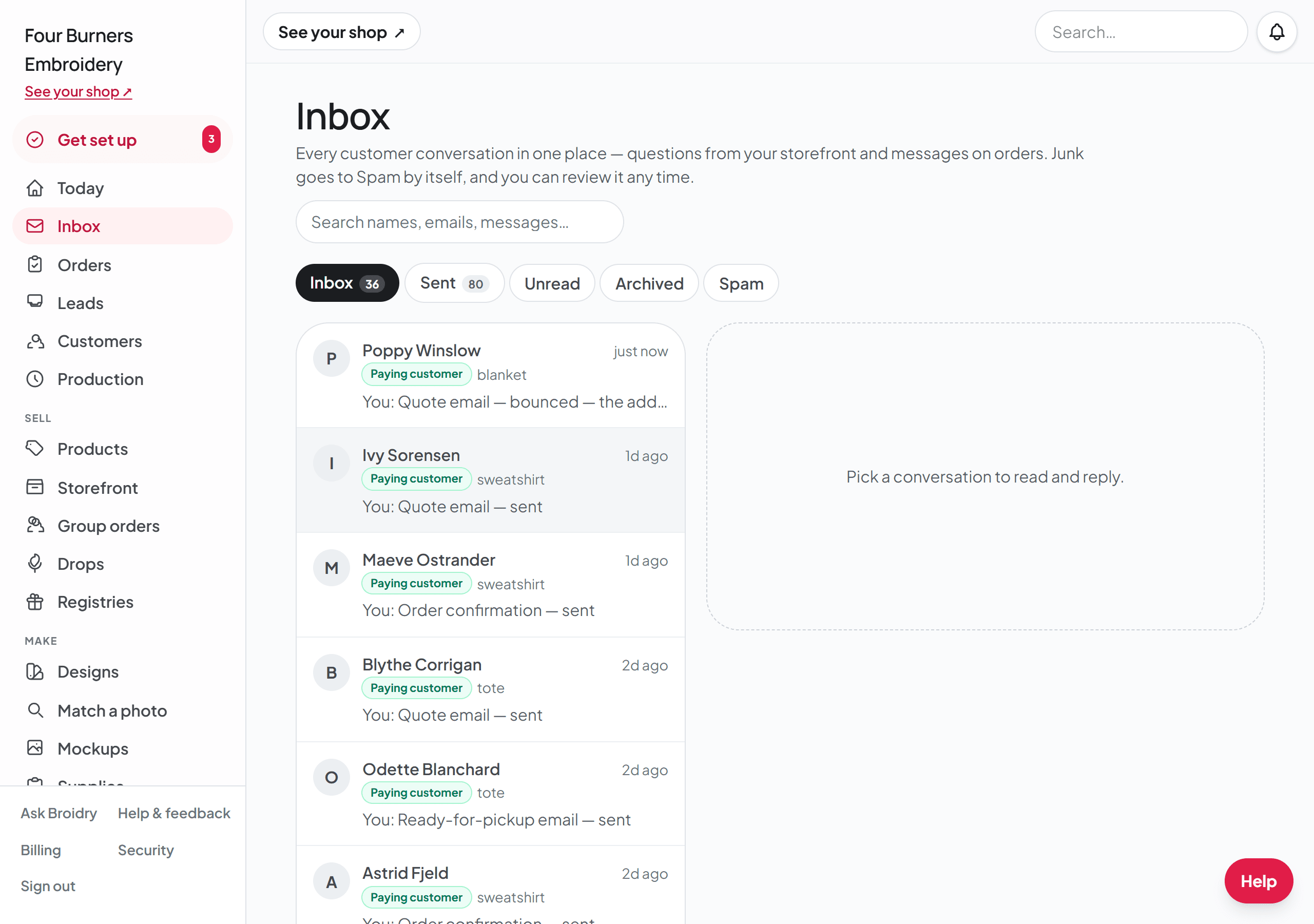
The Inbox is where every conversation with a customer lives. When someone asks a question from your shop page or a listing, and when a customer writes on their order, both show up in the same list — newest first, with a dot on anything you have not read. You will find it in your dashboard menu, right under Today.
Each conversation is labeled so you always know who you are talking to. Potential customer means they have a question but no order yet. Paying customer means there is a real order behind the conversation, with a button that jumps straight to it.
Reading and replying
- 1Open Inbox and click any conversation. The whole back-and-forth is on the right, and opening it marks it read.
- 2Type your reply and click Send. If Broidry drafted a reply for you, it is already waiting in the box — edit it or replace it, nothing sends itself.
- 3On a conversation about an order, click "+ Add photos" under the box and pick one photo or several at once, up to 10 in one reply. They go with your words or on their own. Photos your customer sends show right in the conversation. A conversation with someone who has no order yet takes words only.
- 4Your customer gets the reply by email, with a link back to the conversation. They never need an account.
- 5Use the ••• menu at the top of a conversation to choose Mark unread, Archive, or Block this sender. A conversation with someone who has no order yet also has Mark as spam. A conversation about an order does not.
Seeing that something actually sent
The Sent tab is your Sent folder. Every email Broidry sent your customers is in it, newest first, whichever order it came from. Click one and the words your customer read open beside the list. "Open the whole conversation" at the bottom takes you to that order.
Emails that did not go are in the Sent folder too, marked Did not send, with the reason. An order with no email address on it is the usual one.
You will not find any of this in your own Gmail or Outlook Sent folder. Broidry mails your customers from your shop's own Broidry address, so none of it passes through your email account. The Sent tab is your copy.
Inside a conversation, every email Broidry sent for you appears as a small line in the thread with its outcome: a check mark and "Quote email sent" with the time, or a plain-words reason when one did not go out — no email address on the order, say. So when you send a quote and want to see that it sent, open the conversation and the proof is right there.
Click that line and the email opens right underneath it, word for word as your customer read it. Click it again to close it. Sends from before September 8, 2026 have no wording stored, so those lines do not open.
You will not find these in your own Sent folder. Broidry mails your customers from your shop's own Broidry address, so nothing passes through your Gmail or Outlook. Your copy is the line on the order. Broidry does not put a copy in your inbox.
Reply straight from your email
When a customer messages you, the email Broidry sends you contains their actual words. You can just hit Reply in your own email app: your answer goes to the customer AND is saved in the Broidry thread, so the record stays complete. The same works in the other direction — when a customer replies to one of your message emails, their answer shows up in the conversation.
If a customer attaches photos to their emailed reply about an order, the photos show up in that order's conversation too, right under their words.
One thing to know: reply from the same email address your Broidry account uses. A reply sent from a different address is ignored for safety, because Broidry cannot be sure it is you.
Saved replies for the questions you answer again and again
Most shops answer the same few questions over and over: whether you stitch licensed artwork, how deposits work, how far out you are booking. Save your answer once, and next time it goes into the reply box with one click.
- 1Type your answer in the reply box. As soon as there are words in the box, a link that says "Save this as a reply I can reuse" appears under it.
- 2Click that link and give the reply a short name you will recognize later, like "Licensed artwork". Then click "Save it". If you leave the name blank, Broidry uses the first few words of the message as its name.
- 3Saving keeps only the words in the box. Your customer sees nothing until you click Send.
- 4Once your shop has at least one saved reply, a link that says "Saved replies" appears above the reply box, with the number you have saved in parentheses, like "Saved replies (3)".
- 5Click "Saved replies" to open your list, then click the one you want. Its words go into the reply box. If you already typed something in the box, the saved reply goes under your words.
- 6Change anything you like, then click Send. A saved reply never sends on its own.
- 7To remove a saved reply, open the list and click Delete next to it.
Saved replies on the Leads page
Your saved replies belong to your shop, so the same list is on every lead card on the Leads page. A reply you save from a lead card shows up in your Inbox too, and a reply you save in the Inbox shows up on every lead card.
On a lead you pasted in, like a Facebook chat, the box holds the follow-up message Broidry drafted for you, when there is one. Choosing a saved reply replaces whatever is in that box with your saved words. Change anything you like, then click "Copy message" and paste it wherever you talk with that person.
On a question someone asked from your shop page, choosing a saved reply replaces the answer Broidry drafted, as long as you have not typed in the box yet. If you have typed something, the saved reply goes under your words. Nothing sends until you click "Send answer".
File a conversation away
A conversation you are finished with does not have to sit in your inbox. Open it, click the ••• button at the top, and choose Archive. It moves to the Archived tab. To bring one back, open it from the Archived tab, click the ••• button, and choose Move to Inbox.
Archiving a conversation is about the conversation and nothing else. An order thread you file away keeps its order exactly where it was: same status, still on your board, still in your stitch hours. It is only the message list that gets tidier.
The one time a conversation files itself away is when you archive the ORDER off your board. The thread goes with it, so an order you have set aside stops sitting in your inbox too.
The Spam folder
Shops with a public page get junk — SEO pitches, link blasts, the same message sent to twenty shops at once. Broidry files those into your Spam folder on arrival, with the reason written on each one, and does not ping you about them. Nothing is deleted: open the Spam tab any time to check.
If a real person got caught, open the conversation and choose Not spam — it moves back to your inbox and works normally from then on. If someone keeps bothering you, choose Block this sender: everything they send afterward goes straight to Spam without a sound.