Orders and customers
Drops: a themed collection on one link
4 minute read
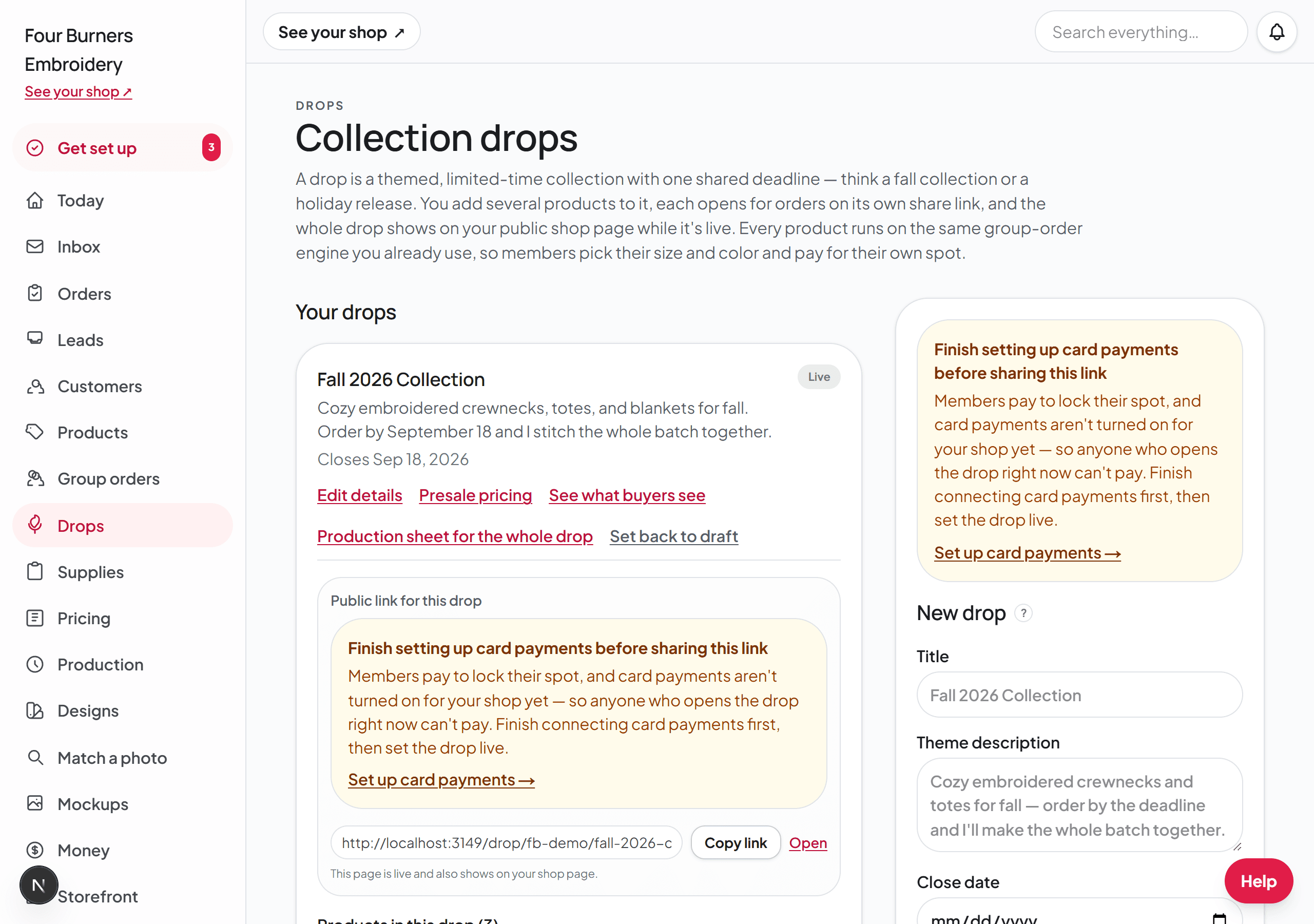
A drop is a themed release: a fall line, a holiday collection, a school-spirit run. It holds several products on one link, and it shows publicly on your shop page. That makes it different from a group order, which is one product you hand to one organizer — a drop is for everyone, and it can hold your whole seasonal line.
A close date is optional. When you set one, every product in the drop closes on the same day, so instead of taking one-off orders all season, you collect them until the close date and then make the whole batch in one efficient run. When you leave it blank, the drop stays open until you close it yourself, which suits a line you keep up all year.
Create one
- 1Open Drops in your dashboard and find the New drop form. Make sure Drop is picked at the top of the form, not Business page.
- 2Give it a title and a theme description in your own words. The description holds up to 600 characters, and the box shows how many you have left. If you want it to stop taking orders on a certain day, pick a close date: every product you add shares it, and if you change it later all the products move with it. Leave the close date blank to keep the drop open until you close it.
- 3Click Create drop, then add products to it. Each product comes from your existing shop products, with a per-person price you set for the drop. To change the order buyers see them in, drag a product up or down — the list rearranges as you drag, and it saves as soon as you let go. Each product also has small up and down arrows next to its grip handle, which is how you reorder on a phone or tablet, where dragging does not work.
The cover photo
Every drop shows one photo: on its tile on your shop page, at the top of the drop's own page, and in the preview when you share its link. There is nothing to upload. Until you pick one, the drop uses the photo of the first product in it that has a photo.
To use a different one, find the drop on your Drops page. The Cover photo box shows the cover photo of each product in the drop, with a check mark on the one in use. Click the photo you want. It saves as soon as you click, and the check mark moves to it.
Presale pricing, if you want it
A drop can carry a presale discount — a percent or a dollar amount off — as a thank-you for ordering early and waiting for the batch. Set it on the drop's Presale pricing panel. Saving the discount does not touch your prices until you apply it; applying it re-prices every product in the drop in one step.
Set it live and share it
A drop starts as a draft so you can build it in peace. Set it live when it is ready, and two things must be true first: card payments are set up, because every drop order is paid by card on the spot, and the drop has at least one product, so buyers never open an empty page.
Then share the drop's own link. Buyers browse the collection, personalize as many pieces as they want, and pay for all of them at once in one cart — one checkout, even across several products.
What a presale promises about dates
A product inside a live drop that has a close date is a presale: the buyer pays now and you stitch after the drop closes. So the turnaround line on that product counts from the close date, not from the day the order came in.
On a product in a drop that closes on September 22, the line reads "Typical turnaround: about 14 days after orders close on September 22". The number of days is your Standard turnaround from the Pricing & settings page, or the product's own "Turnaround for this item" when you gave it one. Move the drop's close date and every product in it moves with it.
Once the drop closes, that product goes back to reading "Typical turnaround: about 14 days once your order is confirmed". If you have saved no turnaround at all, the line is left off rather than promising a number you never set.
A drop with no close date has no batch date to count from, so its products read "Typical turnaround: about 14 days once your order is confirmed" the whole time it is open. Products on a business page read the same way.
Pickup or shipping
In the cart, before the card form, every buyer is asked one question: are they picking these up from you, or do you need to mail them? Nobody gets through checkout without answering it, so a buyer can never assume a sweatshirt is coming to their door when you were expecting them at yours.
If you ship, the choice shows both options with the price next to each: picking up is free, and shipping shows your flat rate from the Shipping card on your Pricing & settings page, under the Policies & shop details tab. Buyers who choose shipping type the address right there, it is charged once for the whole cart no matter how many pieces are in it, and the address rides on every order so your board and your packing list both show it. If you have a free-over amount set, a cart that reaches it has the shipping taken off at checkout.
If you do not ship, the cart says so plainly: these are picked up from you, and nothing is being mailed. Turn shipping on or off, and set what you charge for it, on the Shipping card on your Pricing & settings page, under the Policies & shop details tab.
Each drop can also set its own rule. Click Edit details on the drop and pick one under How buyers get it: Pickup only, Shipping only, or Buyer chooses pickup or shipping. With Shipping only there is no pickup button, every cart asks for the address, and your shipping rate is added once for the whole cart. That fits a drop you sell inside another store: one link for people who will pick up at that store, and a second link, set to Shipping only, for people who want it mailed to them.
Every product in a drop follows that one setting. The products sit under Group orders too, but their Pickup and Ship to organizer switches do not apply inside a drop, so there is no Ship to organizer to turn on and no need for one. When a buyer opens a product to personalize it, the form says what the cart will ask: with Buyer chooses pickup or shipping it reads that they can pick it up or have it shipped and will choose in the cart. The product form never shows a shipping button, so testing a product alone will look like pickup only. The choice shows up once a piece is in the cart: press "Add to cart", and under "How are you getting these?" the cart shows "Pick up in" your town marked Free next to "Ship them to me" at your shipping rate. The product's own link from your drop page opens that product on the drop, so a buyer who comes in that way can choose shipping too.
If buyers still only see pickup, check two things: How buyers get it on the drop says Shipping only or Buyer chooses pickup or shipping, and the Shipping card on your Pricing & settings page is turned on with a rate saved. Either one off, and the drop falls back to pickup only.
When it closes
On the close date the drop stops taking orders on its own. A drop with no close date keeps taking orders until you click Set back to draft. Open its production sheet and everything paid is batched for stitching, the same way a group order batches — by garment, then color, then size, with each buyer's name and wording on its line.
If you remove a product that someone already ordered through, the orders are never lost: that product stays behind as its own group order so the paid buyers keep their spots.
To get rid of a whole drop, click "Delete this drop" on it. Each product in it goes back to being its own group order on its own link, and every order and payment stays where it is. Only the drop itself goes away, and that cannot be undone.